|
|
|
|
With Cornerstone Cal Station, you can choose the Test and Calibration method or methods that work best for your process and quality requirements. Regardless of the method used, the end result is a complete historical record of your calibration activity. From this database you can display, graph, and print calibration records and reports. Docking Calibration
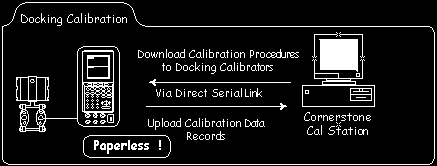
In the Docking window, you assemble instrument calibration "routes" that are collections of instruments you wish to be calibrated by a single calibrator. You build the Route according to your selection criteria. Route definitions remain in the database for as long as you wish. Routes are directly downloaded to an intelligent calibrator via a serial cable. The download data includes instrument ID’s, test points, accuracies, and setup and wrapup advisory prompts. Bring the calibrator back to the Cal Station as often as you like, to upload the test results collected to date. Route status displays show you the status of all instruments downloaded to the calibrator so that you can track the progress of the route. Docking requires optional Docking CalLib software tailored for the types of docking calibrators that you choose. Manual Docking
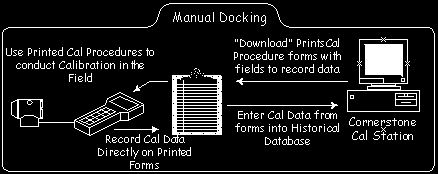
This method allows you to employ all of the calibration management features of the Docking window with any process calibrator. Rather than directly connecting to a calibrator, a route is "downloaded" to a printed report. For each instrument, the report includes key instrument parameters, calibration set-up and wrap-up advisory text, and test point values for the pre-assigned cal scheme. Using the printed report as your guide, you record field test results in the fill-in-the-blanks spaces provided in the test point table. A manual upload function steps you through the entry of the recorded data into Cal Station. Directed Calibration
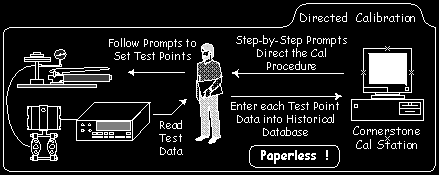
This method can be used when your Cal Station computer is in close proximity to your calibration activity. When you select an instrument for Directed Calibration, Cal Station steps you through the calibration procedure with instructions displayed on the monitor. You enter test data for each test point, as requested by the computer. Error calculations and test results are presented immediately. Manual Calibration
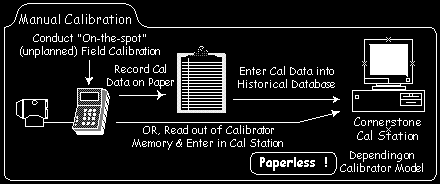
Even if you had not scheduled a calibration using a Route or had not performed a Directed Calibration, Cal Station can still record data from any manual calibration you may perform. Depending on the calibration equipment you choose, you may need to record field calibration data on paper for transport to the Cal Station. If your calibrator can store test results in memory and display them on demand, then no paper is necessary. Cal Station provides a special manual calibration data entry feature that takes you step by step through the entry of your field generated test data. |
|
applied system technologies, inc. ã Copyright
2000 Applied System Technologies, Inc. All
rights reserved. |